brain

A personal “digital brain” for working with Claude Code: a folder of plain markdown notes that Claude reads instead of re-deriving context every session, plus a small local app to browse and act on them.
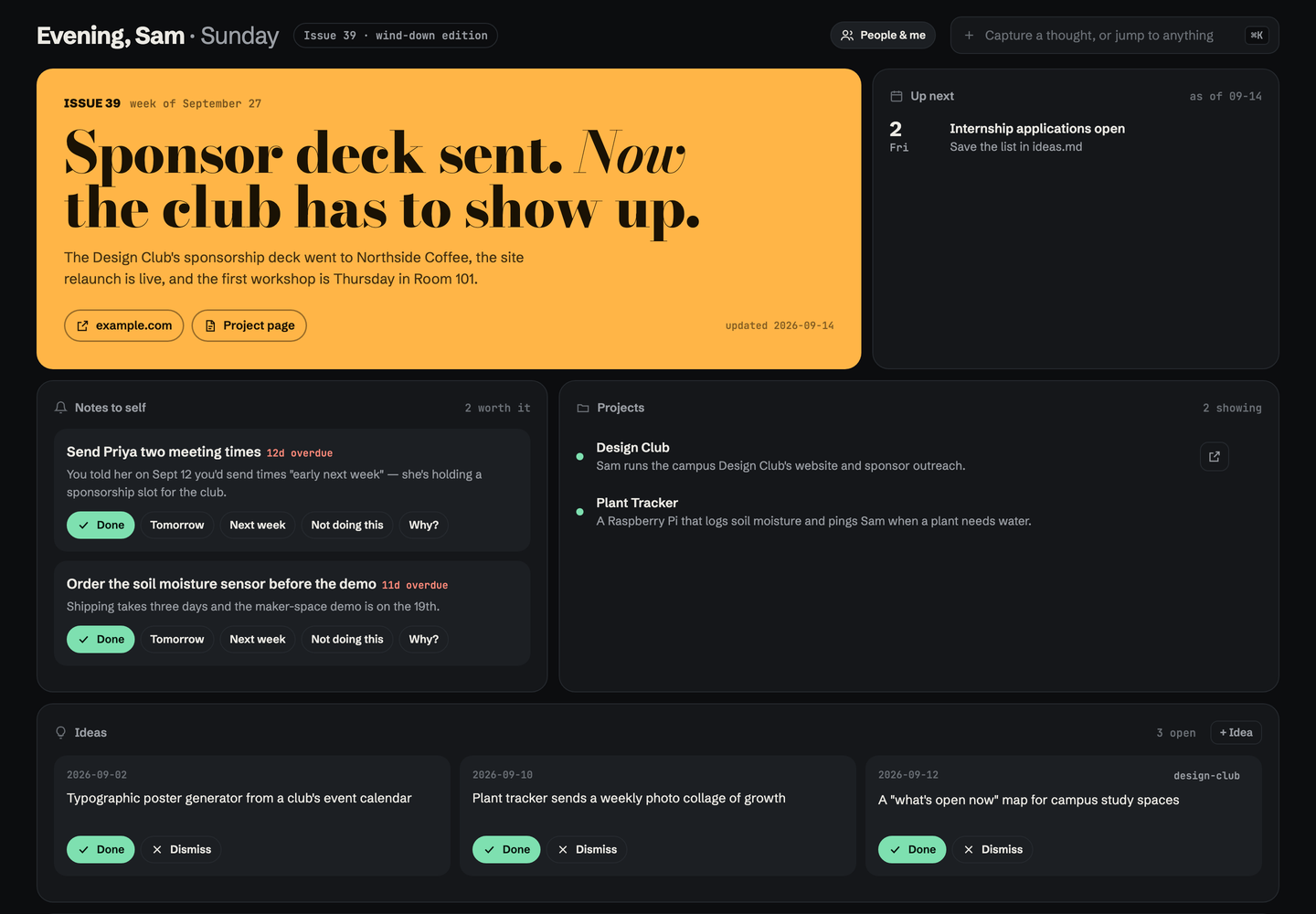
- Cover story: Claude writes a magazine-style headline about your week after real work.
- Notes to self: reminders Claude adds only when they help. You can mark them Done (with confetti), snooze them, or say “Not doing this”, which retires them for good.
- Projects: hide the ones you’re not working on; they wait under “Show hidden”.
- How Claude adapts to you: habits Claude follows every session. Claude can propose a new one, and you switch each on or off. You can also brainstorm a habit in the app, and Claude talks it through with you next session. Past habits stay out of the way.
- ⌘K capture: type a thought, idea, to-do or person. Claude files it into the right note next session.
- Ideas board: mark ideas done or dismiss them.
- Edit in place: every note, person and project page opens in a side panel with a live markdown preview. ⌘S saves the file.
- Reopen anything: copy the command to resume a past Claude Code chat, open a project in VS Code, or open its live site.
- Map of everything: if you’ve run graphify (the Claude Code skill) on your notes (
graphify-out/graph.json), a Map tile draws the knowledge graph in the app’s colours. Hover a dot to see its links, click to open its note, use the legend to focus one cluster, or search it: type a few letters and it suggests matching ideas and clusters, then flies to the one you pick. - Light and dark: two matte themes, Pro Black and Frost, that follow your system until you pick one: the chip in the desktop top bar, or Settings → Dark mode on the phone. Each device keeps its own choice.
- Everything we’ve done: one self-contained note per session, in a full-width timeline.
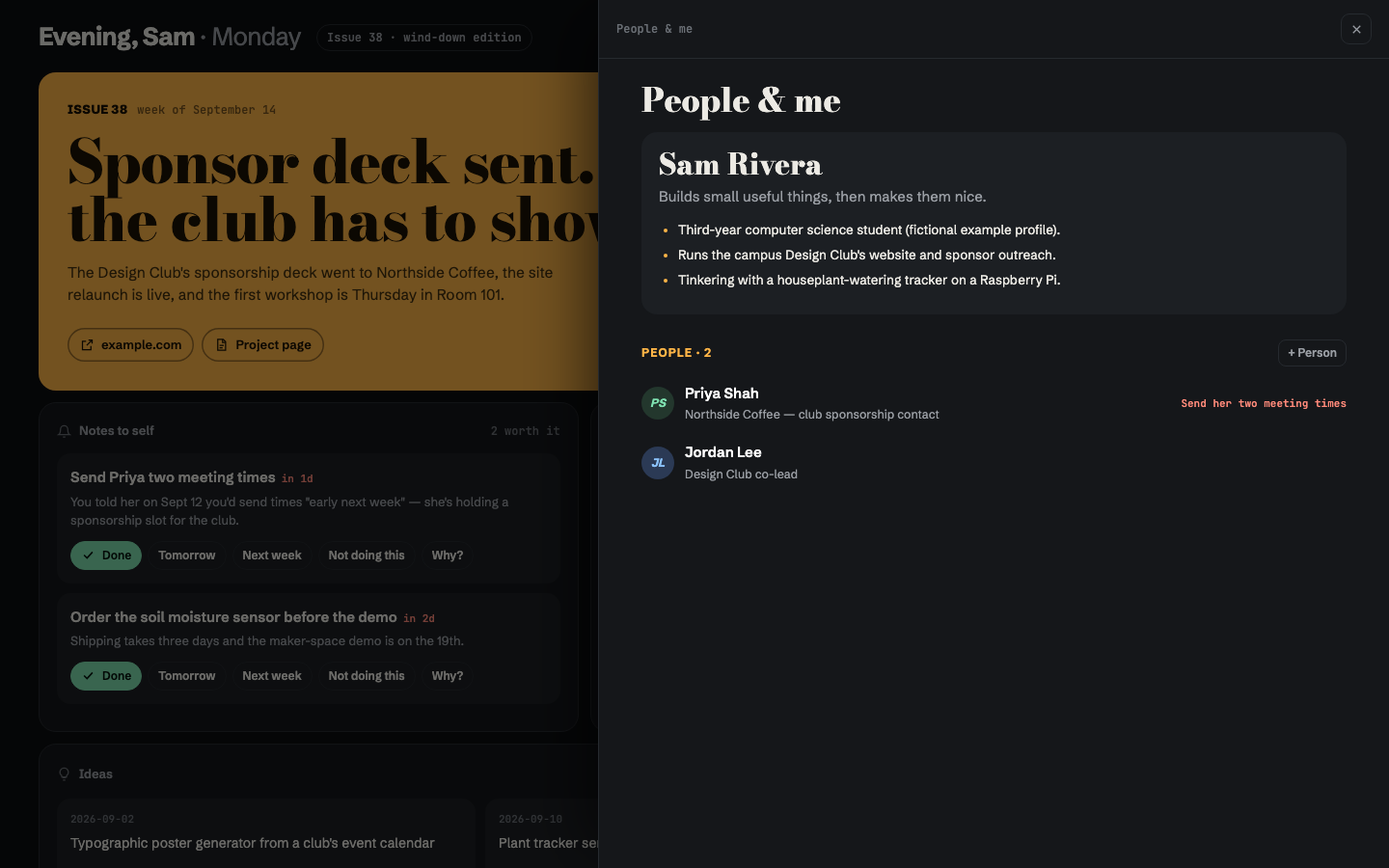
- People & me: your profile and contacts, one click away but out of the main view.
- On your phone: a home-screen app with the cover, Up next, Notes to self, projects, ideas, habits and capture. It works with your laptop off, using a private GitHub repo as the backend. Set it up →
- Background agents: anything you capture can start a headless Claude Code agent that files it or does it. More →
- Stats: prompts sent, sessions, subagents, tool calls, tokens and storage, with 30-day charts, read straight from Claude Code’s transcripts.
- How well Claude knows you: Claude logs each bet it makes about what you’ll want (a recommended option, a guess, a draft), and Brain scores its calibration.
Everything is plain markdown on your machine. The app is a few small Python files plus one HTML file, uses only the standard library, has no build step, and runs on macOS, Windows and Linux.
How I actually use it
I’ve run every Claude Code session through this since May 2026: 49 sessions across 13 projects, with 15 habits Claude follows on every session. A few things it has shipped:
- qweb.dev, the 2026 site for Queen’s Web Development Club, which I co-chair: rebuilt in React + Supabase and shipped through PRs.
- zacfinkelstein.ca, my portfolio.
- The weekly admin of a full course load: syllabi into my calendar, lab prep, reminders.
The habits are the part I’d copy. Each one exists because something went wrong once. For example, I brought Claude a popular “LLM council” skill (11 subagents per question). It argued me out of it: same model, fake independence, and 10–20× the tokens for an answer I can get by asking. That argument became a habit: when I pitch a project, Claude argues against it first.
My setup
The 16 habits Claude follows every session (from claude/habits.md; each started as something that went wrong once):
| How we talk | How Claude works | What Claude never does |
|---|---|---|
| Lead with the answer, keep it short | Read the brain first, write it back after | Invent facts about my club; real content only |
| Pitch one practical thing, then move far | Check my notes before trawling email and calendar | Relitigate a decision I’ve already made |
| Argue against a new project idea before building it | Open a task list when work has 3+ steps | Reach me through the terminal (it’s the calendar; my laptop stays home) |
| Let me pick more than one answer | Check both calendars before proposing times | Trust a branch other than main on the club site |
| Interested, not eager, in outreach | Open finished files for me, and commit + push notes after updating them | Treat an iCloud-synced Desktop like a normal folder |
Skills I wrote:
-
/wild: the one exception to “argue first”. When I say “go wild”, Claude generates 40+ ideas across 8 forced angles (absurd scale, wrong medium, flip the user, collide my projects, cog sci, startup-in-10-days, anti-idea, pure bit), pushes the 5 strangest further, then lands on exactly two: one doable this month and one pure fun. Tested against a no-skill baseline: 12 sensible ideas became 45 across every angle, 7 of them physical. Make your own: paste this into Claude Code and it builds a/wildaround your projects, your field and your constraints, then test-runs it on one of your projects:Make me a personal /wild skill for Claude Code: a mode I trigger by saying "go wild" that floods me with over-the-top ideas, then lands on the two worth doing. Use https://github.com/zacfink/brain/blob/main/skills/wild/SKILL.md as the template. Keep its shape exactly: the flood (40+ one-line ideas under forced lenses, at least 4 per lens), mutate (push the 5 strangest one level further), land it (exactly two picks: "wild but doable this month" with a first step, and "pure fun"), then stop. Keep its common-mistakes table. Personalize it to me: 1. First look for context about me: a CLAUDE.md, a notes folder (like ~/Notes/INDEX.md), my repos. Then ask me at most 3 short questions to fill gaps: my projects, what I study or work on, and my real constraints (time, money, gear, where I usually am). 2. Rewrite the "Collide projects" lens with my actual projects, and the "Cog sci mode" lens as the deep field I care about (swap it for mine, e.g. economics, biology, music). 3. Replace one lens with one invented for me. For a designer that might be "make it ugly on purpose"; for a founder, "sell it to your harshest customer". 4. Rewrite the Grounding section to point at wherever my context actually lives. 5. Update the description's trigger phrases to include how I'd naturally ask. Save it to ~/.claude/skills/wild/SKILL.md. Then test it: run it once on one of my real projects and show me the result, so I can see it works before I rely on it.
What I build on: Superpowers (brainstorm, then spec, then plan, then test-first for anything real), graphify (the Map), and the impeccable design plugin for UI work. Brain is the glue: it’s where the habits, the specs and every session’s outcome live.
Start from scratch (one prompt)
New to Brain? Paste this into Claude Code and answer its questions. It does every step below for you and ends by giving you a link to open on your phone.
Set up Brain (https://github.com/zacfink/brain) for me from scratch. Work through it step by step, tell me what
each step is for in one line, and ask me before anything that touches my accounts.

1. Clone https://github.com/zacfink/brain.git into ~/Notes/.brain (keep anything already in ~/Notes), link
   ~/Notes/.brain/bin/brain into ~/.local/bin (create it, and add it to my shell profile's PATH if it isn't
   there), and read ~/Notes/.brain/README.md and FORMATS.md before going on.
2. Interview me briefly: my name, what I do, my active projects, people I work with, anything due in the next two
   weeks. Then write my first notes in the FORMATS.md shapes: me.md, now.md, one page per project, people pages,
   nudges.md, ideas.md, inbox.md and claude/habits.md (two or three habits from what I told you, status "proposed").
   If you can see my projects folder, calendar or email, use them to fill gaps, and say what you took from where.
3. Connect yourself: add the SessionStart hook from the README to ~/.claude/settings.json (merge, don't overwrite),
   and add the README's standing instructions to my CLAUDE.md. Then run python3 ~/Notes/.brain/build.py.
4. Start the app with `brain` and check it opens at http://127.0.0.1:4747.
5. Phone (ask me first): add ".brain/" to ~/Notes/.gitignore, create a PRIVATE GitHub repo "notes" with gh,
   add docs/notes-workflow.yml as .github/workflows/brain.yml plus phone/queue/.gitkeep, commit and push, and wait
   for the Action's first run to write phone/state.json.
6. Walk me through making the phone key (README → On your phone, step 3); I paste it to you. Then give me my
   one-tap install link: https://zacfink.github.io/brain/mobile/#c= followed by base64 of
   {"repo":"<me>/notes","token":"<key>"}. Tell me to open it in Safari, tap Share → Add to Home Screen, and treat
   the link like a password. Don't save the key anywhere.
7. Finish with a short list: what's set up, what I should try first, and anything that didn't work.
Try it (30 seconds)
git clone https://github.com/zacfink/brain.git
cd brain
python3 app/server.py --notes example      # opens http://127.0.0.1:4747  (Windows: py app\server.py --notes example)
example/ is a fictional student’s notes. Requires Python 3.9+ and nothing else.
Use it for real
The brain folder lives inside your notes folder as .brain/, so the app finds your notes as its parent:
mkdir -p ~/Notes && git clone https://github.com/zacfink/brain.git ~/Notes/.brain
ln -s ~/Notes/.brain/bin/brain ~/.local/bin/brain    # any folder on your PATH
brain                                                # start + open;  brain stop / restart / log
Windows: clone into %USERPROFILE%\Notes\.brain and run %USERPROFILE%\Notes\.brain\bin\brain.cmd (or add
bin to your PATH and run brain). It opens your browser; close the window to stop it.
Start your notes from the shapes in FORMATS.md. You can also copy example/ and edit it, or just ask
Claude Code to draft them from your projects, calendar and email. BRAIN_NOTES=/some/folder brain points the app
somewhere else.
Connect Claude Code
- Session-start hook tells Claude your active habits and any inbox captures. It adds a few hundred tokens and makes no model call.
Add to
~/.claude/settings.json:"hooks": { "SessionStart": [{ "hooks": [{ "type": "command", "command": "python3 ~/Notes/.brain/session_start.py 2>/dev/null || true", "timeout": 5 }] }] }On Windows, use
pythoninstead ofpython3(Claude Code runs hooks through Git Bash, so the rest works as is). - Instructions in your
CLAUDE.mdor Claude’s memory, for example:~/Notesis my brain. Before project work, read~/Notes/INDEX.mdand the project page. File any inbox captures into the right note. Followonhabits inclaude/habits.md, and propose (never enable) new ones. Add nudges tonudges.mdonly when they clearly help me, and never re-add one markedno. After real work, write a session note (.brain/session-template.md), update the project page andnow.md, then runpython3 ~/Notes/.brain/build.py.
Connect Codex
Codex has no session-start hook, but it reads ~/.codex/AGENTS.md at the start of every session. Run this once:
python3 ~/Notes/.brain/codex.py
It adds a marked Brain block to that file with the standing instructions (read INDEX.md first, follow the on
habits, file inbox captures, write a session note) plus the current habits and inbox. Brain refreshes the block every
time it rebuilds INDEX.md, and anything else in the file is left alone. To have background
agents run through Codex instead of Claude, start Brain with BRAIN_AGENT=codex brain.
They use codex exec in a workspace-write sandbox: your notes and ~/Projects, no network.
Windows: run py %USERPROFILE%\Notes\.brain\codex.py once, then start Brain with Codex agents from a Command
Prompt with set BRAIN_AGENT=codex followed by %USERPROFILE%\Notes\.brain\bin\brain.cmd (PowerShell:
$env:BRAIN_AGENT="codex"). Log in to Codex first (codex login), since background agents can’t answer a login prompt.
How it fits together
~/Notes/                      your notes (keep private)
├── INDEX.md                  generated table of contents — Claude reads this first
├── me.md  now.md  nudges.md  ideas.md  inbox.md
├── claude/habits.md
├── projects/<slug>.md        current truth per project
├── people/<slug>.md
├── sessions/YYYY-MM-DD-*.md  one note per Claude Code session (history)
├── agents/                   optional: turns on background agents; one log file per run
├── phone/                    optional: turns on the phone app (queue/ + state.json)
└── .brain/                   this repo
    ├── app/server.py         stdlib HTTP server: reads/writes the notes, serves the app
    ├── app/index.html        the whole UI (vanilla JS, no build)
    ├── app/theme.css         colours and light/dark themes, shared with the phone app
    ├── app/agents.py         background agent runner (queue, one at a time, status files)
    ├── app/sync.py           git pull/commit/push for the phone app
    ├── app/phone.py          applies phone actions on GitHub, writes phone/state.json
    ├── mobile/               the phone app (served from GitHub Pages)
    ├── build.py              regenerates INDEX.md
    ├── session_start.py      Claude Code SessionStart hook
    ├── codex.py              Codex adapter: keeps a brain block in ~/.codex/AGENTS.md
    ├── bin/brain, brain.cmd  launchers (macOS/Linux, Windows)
    ├── FORMATS.md            file shapes the app parses
    ├── example/              fictional notes to try it with
    └── tests/                unit tests, run on every push by GitHub Actions
Why markdown files instead of a database? Claude reads and edits them with the tools it already has. Opening a file costs nothing until it’s needed, and you stay in control of your own data.
Background agents (optional)
Create an agents/ folder in your notes and anything you capture in the app (a note, idea, todo, person or habit
proposal) also starts a headless Claude Code agent (claude -p). It files the thought where it belongs, or does the
task, writes a short report and exits. Runs go one at a time with a 20-minute limit, and a small “agents” chip in the
top bar turns amber while one is working. Click it for the reports.
The agent’s permissions are an allowlist, not a denylist. It runs with --setting-sources project --permission-mode
dontAsk, so your own Claude settings can’t widen it and anything off the list is refused. It can read, edit notes and
project files, search the web, create Gmail drafts and add calendar events. It can’t send email or texts, commit,
push or run arbitrary shell commands. Outward actions come back as drafts for you to send.
Each run writes agents/<time>-<slug>.md (queued, running, then done or failed), so the state survives a restart. The
runner’s tests use a fake claude, so they’re free: python3 -m unittest discover -s tests.
On your phone
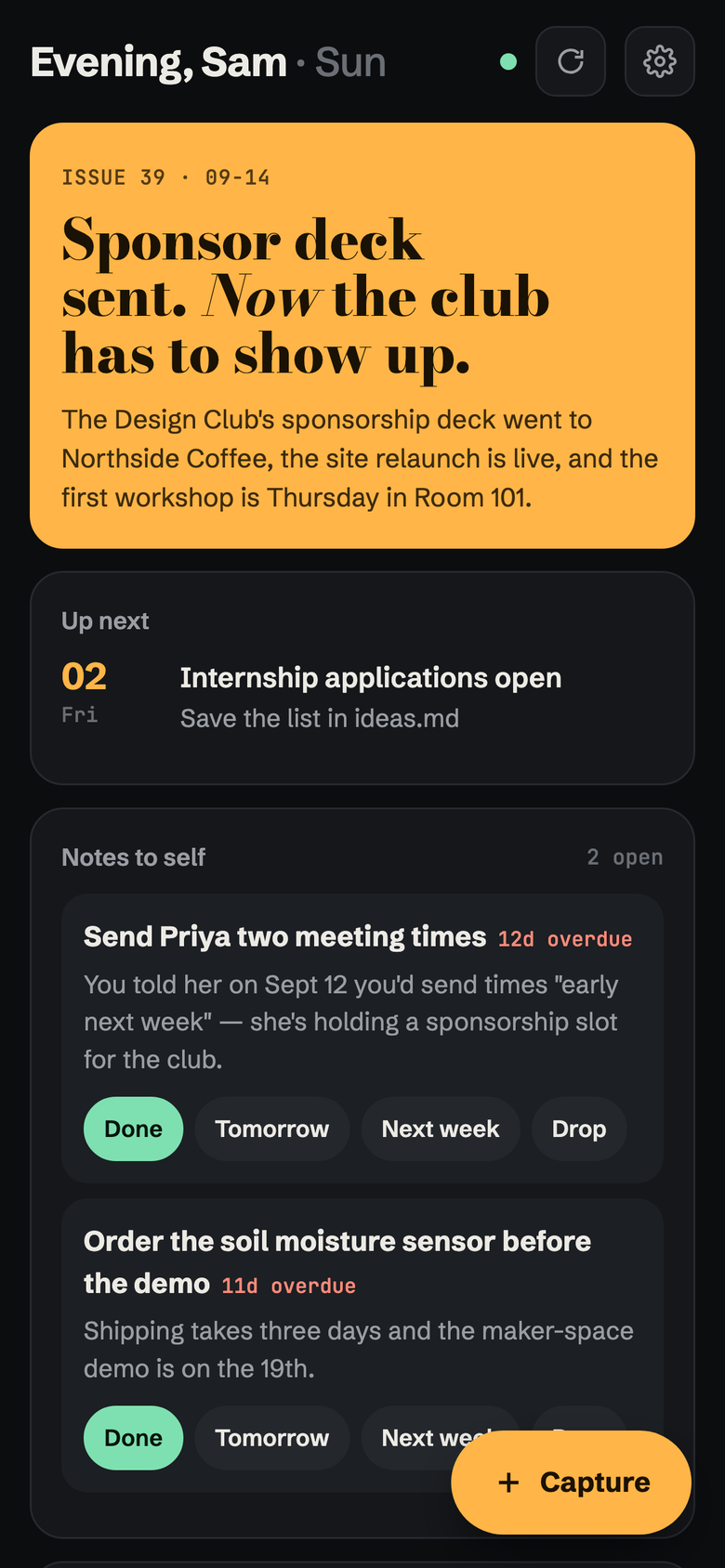
A home-screen app for the parts you use on the go: the cover story, Up next, Notes to self (Done / Tomorrow / Next week / Drop), projects (tap to read), ideas, Claude’s habits and Capture. It works with your laptop closed.
How: your notes live in a private GitHub repo, and that repo is the backend. The phone never edits a note
itself. Each tap drops a tiny file into phone/queue/, and a GitHub Action applies it with the same Python code the
desktop app uses (so the two can’t disagree), then rebuilds phone/state.json, the summary the phone reads. That
takes about 30 seconds, and the phone shows your change straight away in the meantime. A capture from your phone
gets its background agent the next time your laptop pulls.
On your laptop, Brain pulls from GitHub when it starts, when you reload the page and when a Claude session starts. It commits and pushes only the notes it changed itself. If the phone and laptop ever change the same note in a way git can’t combine, it stops and says “Sync paused” instead of guessing.
Set it up (about 10 minutes):
- Put your notes in a private GitHub repo (
~/Noteswith.brain/in its.gitignore) and push it. - Add the Action: copy
docs/notes-workflow.ymlto.github/workflows/brain.ymlin the notes repo, createphone/queue/.gitkeep, then commit and push. Its first run createsphone/state.json. - Make a key for your phone: github.com → your avatar → Settings → Developer settings → Personal access
tokens → Fine-grained tokens → Generate new token.
- Repository access: Only select repositories → your notes repo.
- Permissions: the page lists every permission a key could have, which is normal. Under Repository permissions, set Contents to Read and write. Leave everything else at No access. GitHub sets Metadata to read-only on its own. (Newer GitHub shows an Add permissions button instead: add Contents, then choose Read and write.)
- The summary should read “Read access to metadata” and “Read and Write access to code”. Generate it and copy
the
github_pat_…key.
- Install the app: on your phone, open https://zacfink.github.io/brain/mobile/ in Safari (or Chrome on
Android) → Share → Add to Home Screen. Open it, tap Connect, enter
your-name/notesand paste the key.
The key stays on your phone only. The app’s code is public and holds no notes. You can revoke the key on GitHub
anytime.
Security
The server binds to 127.0.0.1 only. Every API call needs a random per-run token embedded in the page, and requests
whose Host isn’t local are rejected, which blocks DNS rebinding. Reads and writes are limited to .md files inside
the notes folder, never dot-folders. Saves detect edits made on disk since you opened a file, so you won’t
overwrite Claude’s changes.
Your notes folder will likely hold contacts and personal details. Keep it out of public repos, and keep the notes repo private if you use the phone app. The phone’s key can reach only that one repo.
Notes
The tests run on macOS, Windows and Linux on every push. The app is used daily on macOS with Chrome and Safari. Fonts load from Google Fonts, with system fallbacks when offline. Resume
buttons read session ids from ~/.claude/projects.